Spark Optimisation Tips
Nov 24, 2025 • 6 min read
Introduction
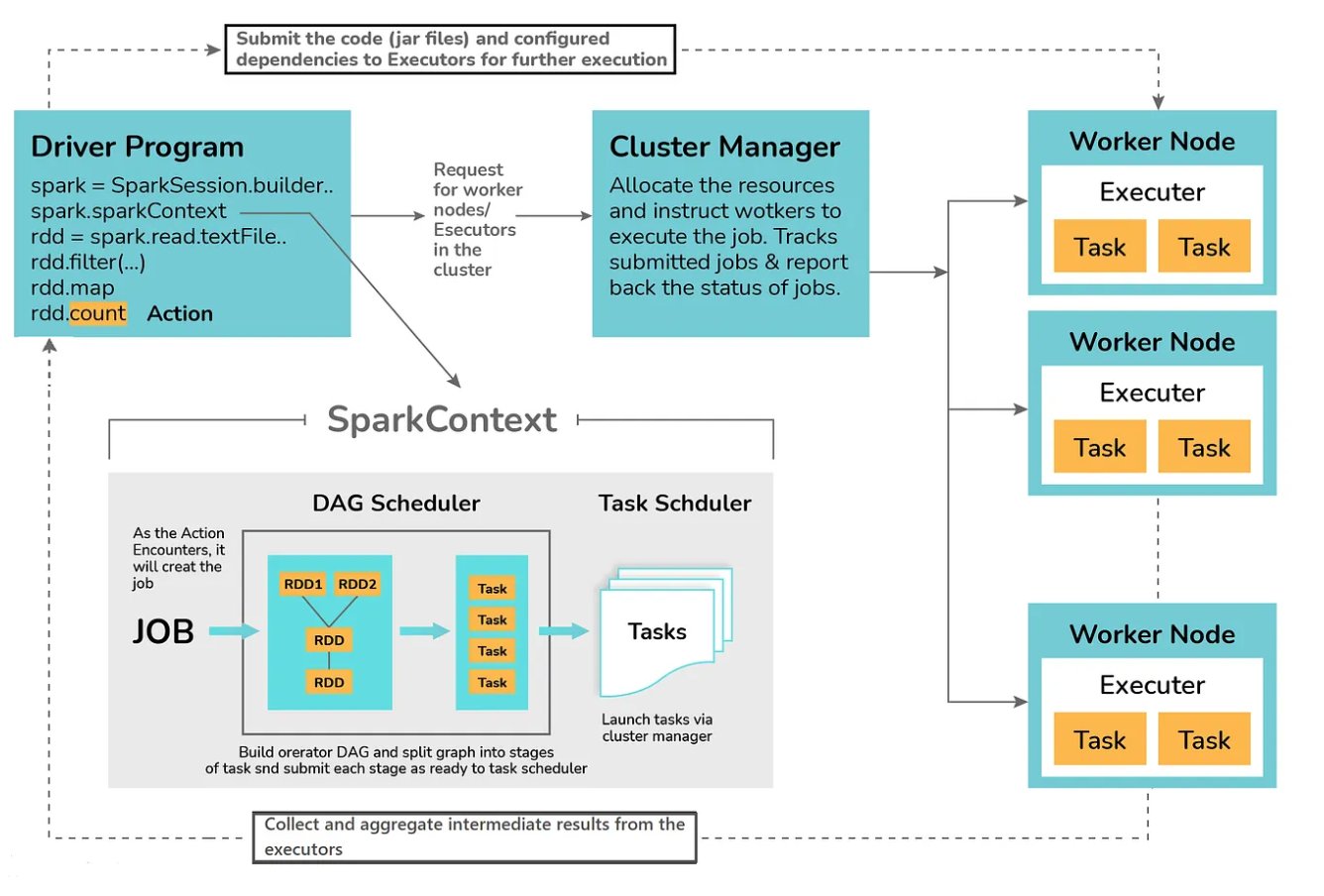
Apache Spark is powerful, but raw power isn’t enough—inefficient code can crush even the biggest clusters.
Whether you’re tuning data pipelines or building machine learning models, optimization is key to scaling performance, reducing costs, and boosting productivity.
In this post, we’ll explore essential Spark optimization techniques every data engineer should know—from partitioning and caching to broadcast joins and Tungsten optimizations.
You’ll also get Colab-ready code examples you can run instantly.
⚙️ 1. Setting Up Spark in Google Colab
Start by installing PySpark in your Colab environment:
!pip install pysparkThen initialize a Spark session:
from pyspark.sql import SparkSession

spark = SparkSession.builder \
    .appName("SparkOptimizationDemo") \
    .getOrCreate()
💡 Pro Tip: Always name your Spark app—it helps track performance in logs and the Spark UI.
🧱 2. Creating Sample Data
We’ll create a synthetic dataset to test optimization strategies. Instead of downloading large files, this simulates a transactional system:
from pyspark.sql import Row
import random

# Create sample transaction-like data
data = [
    Row(user_id=i, amount=random.randint(10, 1000), category=random.choice(["A", "B", "C", "D"]))
    for i in range(1, 10001)
]

df = spark.createDataFrame(data)
df.show(5)
Press enter or click to view image in full size
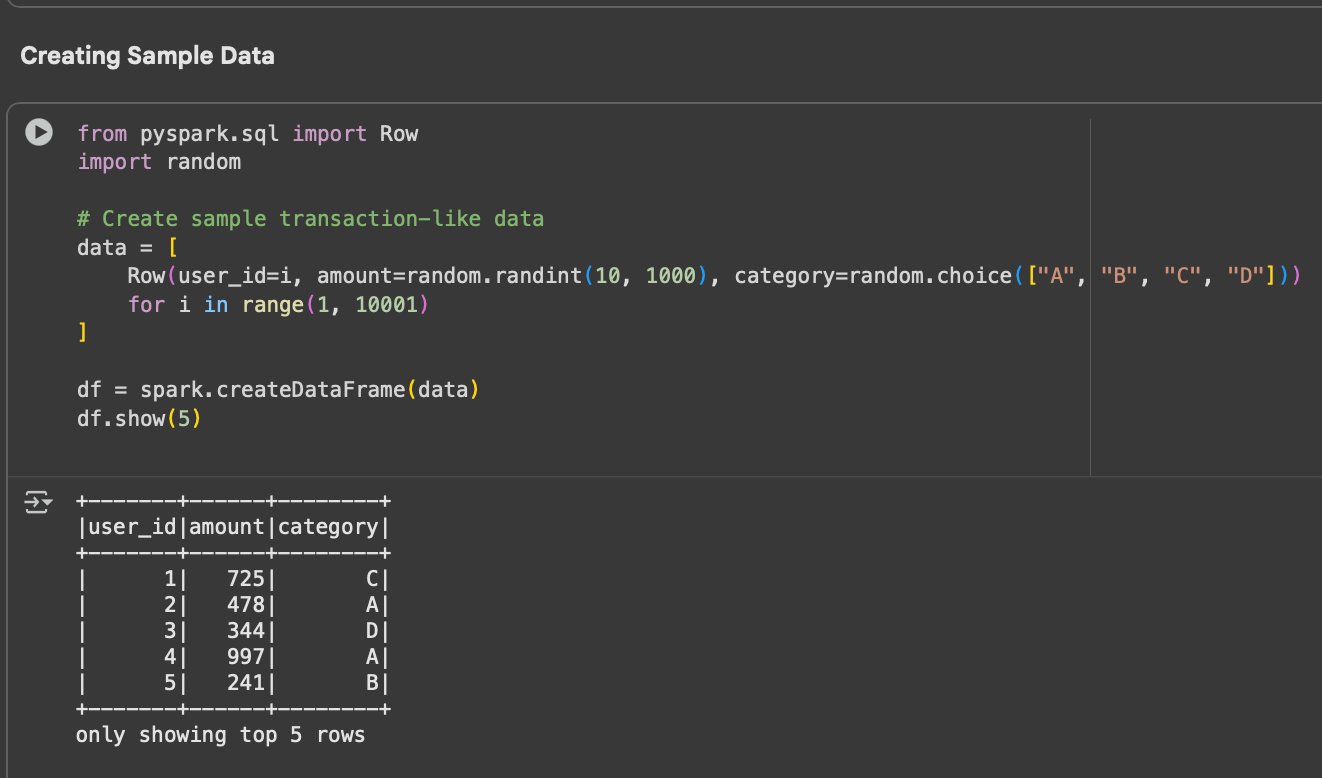
Code Snippet—Sample transaction dataset created in Spark
💬 This lightweight dataset lets us test caching, partitioning, and joins efficiently in Colab.
🧮 3. Optimize Spark with DataFrame Transformations
Transformations like map, filter, select, and groupBy are lazy—Spark builds a logical plan but doesn’t execute until an action (show, count, etc.) is called.
Example:
filtered_df = df.filter(df.amount > 500)
filtered_df.select("user_id", "amount").show(5)
Press enter or click to view image in full size
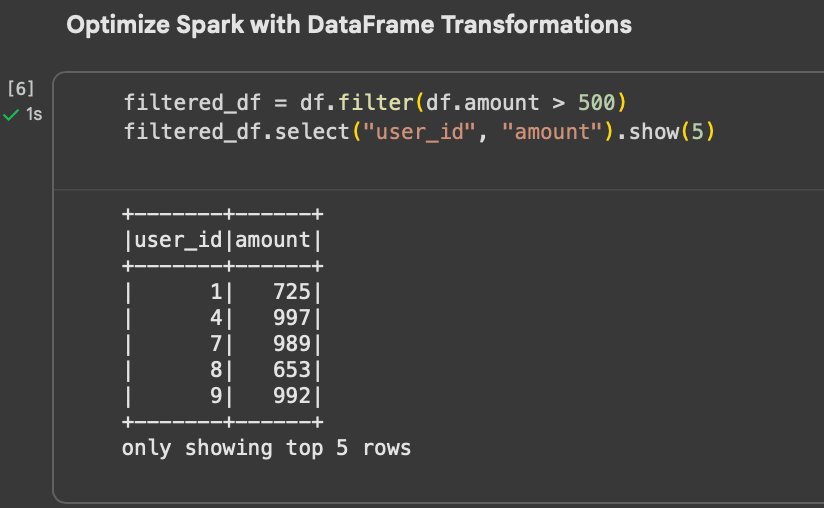
Code Snippet—Filtering high-value transactions and selecting relevant columns—demonstrating Spark’s lazy evaluation
💡 Pro Tip: Chain transformations logically and avoid unnecessary actions like repeated show() or count() calls in production.
⚙️ 4. Partitioning and Parallelism
Partitioning controls how Spark distributes data across executors. Bad partitioning leads to data skew and performance drops.
Check how many partitions your DataFrame has:
print(df.rdd.getNumPartitions())You can repartition or coalesce for optimization:
df = df.repartition(4, "category")Press enter or click to view image in full size
Code Snippet—Checking and adjusting Spark DataFrame partitions for better parallelism and workload balance
💡 Pro Tip:
- Use
.repartition()for wide shuffles (expensive). - Use
.coalesce()to reduce partitions without a full shuffle (cheap).
📊 Bonus Tip—Monitor in Spark UIVisualize the effect of partitioning directly in the Spark UI (usually at
localhost:4040in local mode).Check the Stages and Tasks tabs—fewer, balanced tasks indicate efficient partitioning.If some tasks take much longer, that’s a sign of data skew or uneven partitions.
🔄 5. Cache and Persist for Reuse
If you reuse a dataset multiple times, cache it:
cached_df = df.filter(df.amount > 300).cache()
print("Count:", cached_df.count())
Press enter or click to view image in full size
Code Snippet—Data cached for repeated transformations
💬 This avoids recomputing the same dataset every time it’s accessed.
💡 Pro Tip: Use .persist(StorageLevel.MEMORY_AND_DISK) when data is large enough to spill beyond memory.
⚡ 6. Optimize Joins with Broadcast
When one dataset is small, broadcast it to all executors—this prevents large shuffles:
from pyspark.sql import functions as F

small_df = spark.createDataFrame([( "A", "Category A"), ("B", "Category B"), ("C", "Category C"), ("D", "Category D")], ["category", "category_name"])

joined = df.join(F.broadcast(small_df), "category")
joined.show(5)
Press enter or click to view image in full size
Code Snippet—Broadcast join minimizes data movement
💬 Spark sends the small dataset to every worker—no network shuffle required.
🧩 7. Avoid UDFs When Possible
User-Defined Functions (UDFs) are convenient but break Spark’s optimized execution plan (Catalyst).
Instead of a UDF:
# BAD: UDF slows down execution
from pyspark.sql.functions import udf
from pyspark.sql.types import IntegerType

@udf(IntegerType())
def double_amount(x):
    return x * 2

df.withColumn("double_amount", double_amount(df.amount)).show(5)
Press enter or click to view image in full size
Code Snippet—Using a Python UDF to transform data—flexible but slower due to serialization and execution outside Catalyst
Use built-in Spark SQL functions instead:
# GOOD: Vectorized native operation
df.withColumn("double_amount", df.amount * 2).show(5)
Press enter or click to view image in full size
Code Snippet—Using Spark’s native column operations for efficient, vectorized computation—avoiding UDF overhead
💡 Pro Tip: Prefer Spark SQL functions or Pandas UDFs over Python UDFs—they run faster and integrate with the Catalyst optimizer.
🧠 Why this matters for AQEWhen you use built-in Spark SQL operations instead of Python UDFs, Spark’s optimizer (Catalyst) can better analyze your query plan.This directly benefits Adaptive Query Execution (AQE)—Spark can adjust execution strategies dynamically only when the plan remains fully optimized and visible to Catalyst.
🧮 8. Skew Handling and Adaptive Query Execution (AQE)
Data skew (some partitions having much more data) causes slow tasks. Spark 3+ introduces Adaptive Query Execution (AQE) to fix it dynamically.
Enable it:
spark.conf.set("spark.sql.adaptive.enabled", "true")Press enter or click to view image in full size
Code Snippet—Enabling Adaptive Query Execution (AQE) for automatic runtime optimization and skew handling
💡 Pro Tip: AQE automatically adjusts join strategies and reduces shuffle partitions at runtime—no manual tuning needed.
# Optional: Tune shuffle partitions
spark.conf.set("spark.sql.shuffle.partitions", 8)  # Default is 200, adjust based on cluster size
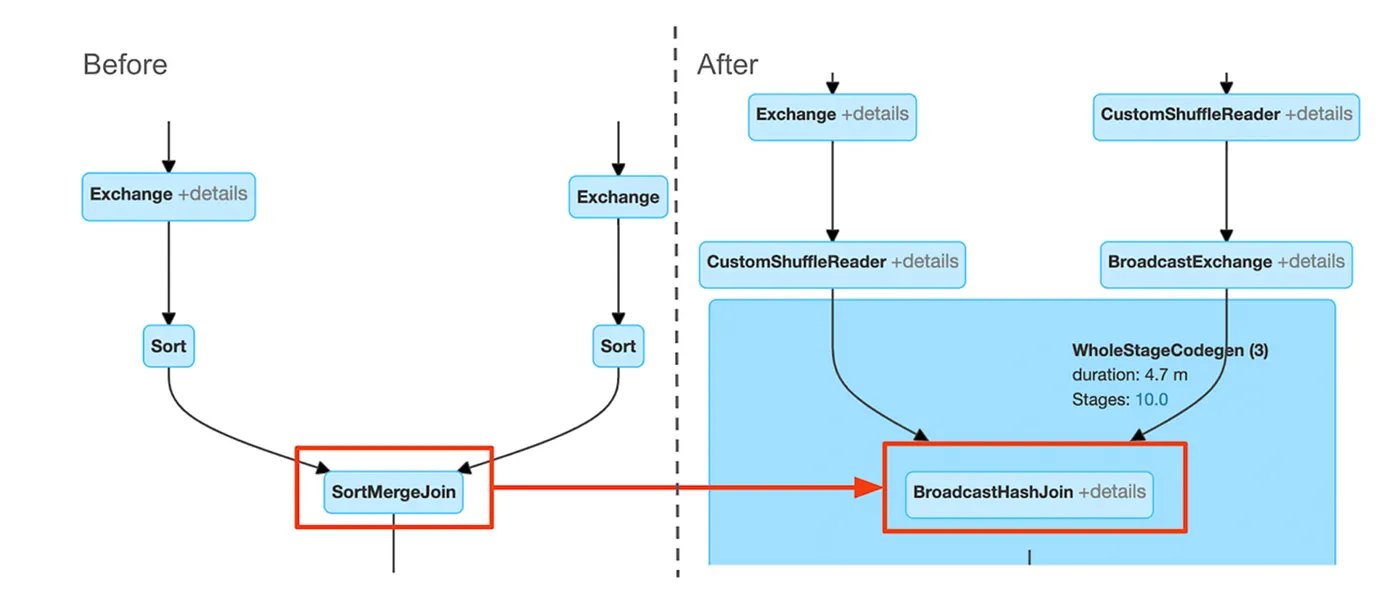
When you enable Adaptive Query Execution, Spark dynamically changes its join strategy and shuffle behavior based on runtime statistics.
The Spark UI below shows how AQE replaces a costly SortMergeJoin with a faster BroadcastHashJoin, optimizing execution automatically:
Press enter or click to view image in full size
Figure: Spark UI after enabling Adaptive Query Execution—notice how SortMergeJoin is replaced by BroadcastHashJoin****, and shuffle stages reduce, resulting in faster execution and balanced tasks
💡 Tip: Fewer shuffle partitions reduce overhead for smaller datasets, while more partitions improve parallelism for larger workloads.
🧠 9. Spark SQL and Tungsten Engine Magic
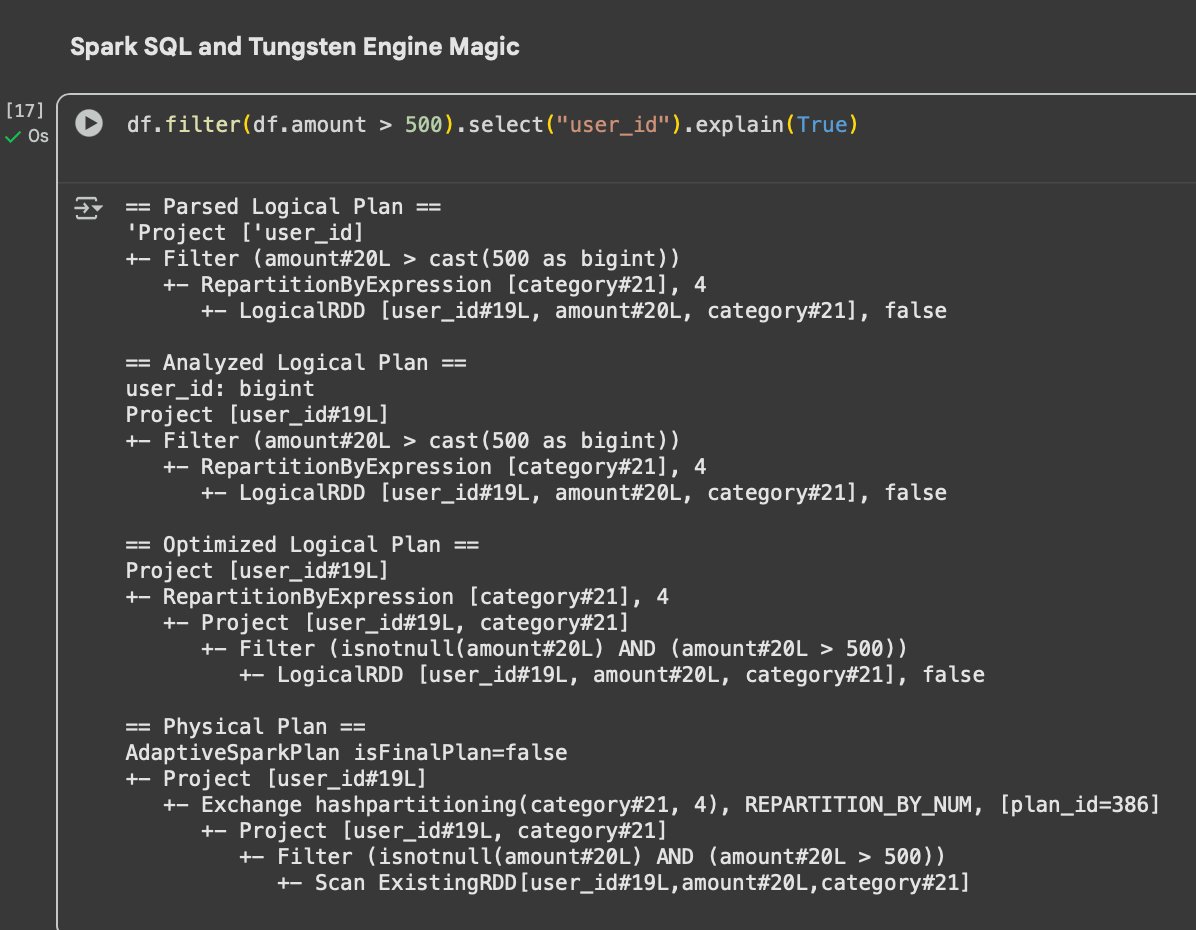
Spark SQL’s Catalyst Optimizer and Tungsten Engine handle logical and physical plan optimizations.
Inspect a query plan using:
df.filter(df.amount > 500).select("user_id").explain(True)Press enter or click to view image in full size
Code Snippet—Logical vs physical plan visualization
💬 Understanding the plan helps diagnose shuffle issues, broadcast hints, and partition imbalance.
⚡ 10. Optimization Tips Summary
Here’s a quick summary of best practices:
Press enter or click to view image in full size
📊 Table 1: Optimization Tips for Efficient Spark Jobs
💡 Pro Tip: Always test optimizations one at a time—some configurations interact in non-intuitive ways.
🧭 Conclusion
Optimization isn’t an afterthought—it’s the heart of efficient Spark engineering.
By caching wisely, reducing shuffles, and leveraging built-in optimizations like AQE, you can cut job runtimes by 10× or more.
When Spark runs fast, your business decisions move faster too.
Every millisecond saved is a win for scalability—treat optimization as part of design, not cleanup.
🔗 Run It Yourself
🎯 Google Colab Notebook
Try all examples here: